
Landscape Design - AI Garden
MOBIVERSITE YAZILIM BILISIM REKLAM VE DANISMANLIKHouse & Home
4.4352.00 Reviews
- Version
- 1.0.41
- Installs
- 100.00K
- Age Rating
- Everyone
Screenshots

Our Review of Landscape Design - AI Garden
 Analysis by Appyee
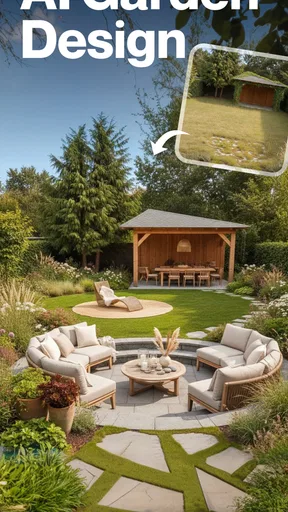
I first looked at Landscape Design - AI Garden as a way to get past the blank-page problem: I had an outdoor space to improve, but no clear plan for how it should look. What makes this app interesting is its AI-led approach to landscape design. Rather than starting with a blank drawing, you can use a photo of your garden to explore possible directions. That makes it especially useful when you need visual inspiration before deciding what to change in real life.
Getting Started with Your Dream Garden
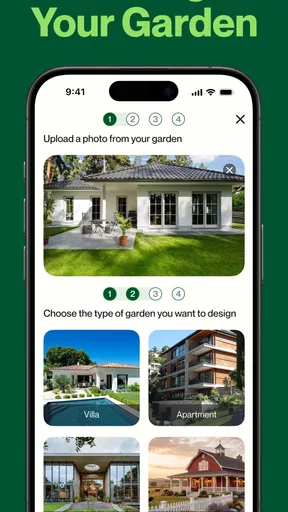
First things first, downloading the app was a breeze. Available on both Android and iOS, it’s super accessible. Once you’ve got it on your phone, you’re greeted with a user-friendly interface that makes you feel right at home. The app guides you through an easy setup process, asking about your preferences and the size of your outdoor space. I really appreciated this part because it makes the app feel personalized right from the get-go.
The Magic of AI in Your Backyard
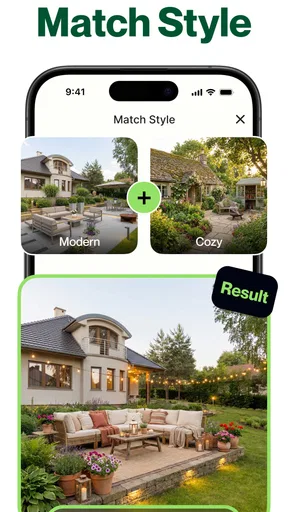
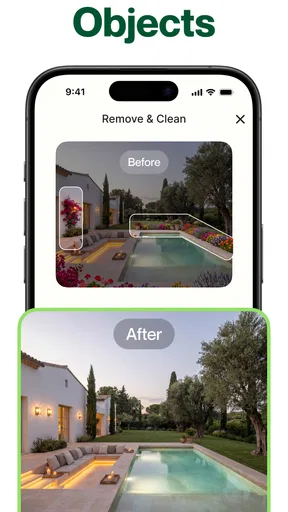
Now, here’s where the real magic happens. Landscape Design - AI Garden uses artificial intelligence to generate design ideas tailored specifically to your space. You simply upload a picture of your garden, and the app does its thing, suggesting layouts, plants, and even color schemes. It’s like having a professional landscape designer in your pocket!
One of my favorite features is the ability to see these designs in augmented reality. You can literally walk around your garden and see the changes in real-time. It’s surreal and super helpful for visualizing how everything will look once it’s all done.
Customizing to Your Heart’s Content
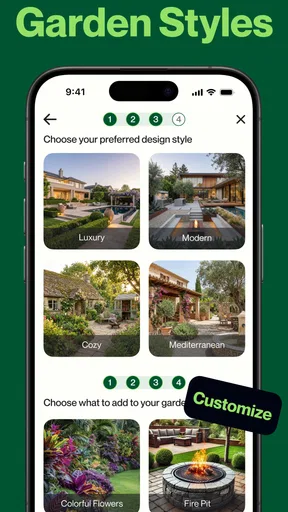
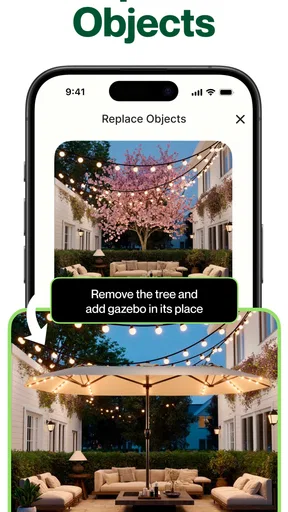
After you get your initial design suggestions, the app gives you plenty of tools to tweak and customize. Want to add a water feature or a vegetable patch? No problem. The app’s drag-and-drop functionality makes it easy to experiment with different elements until you find the perfect setup. I had a blast playing around with various options, and it really helped me nail down what I wanted.
Plus, the app provides detailed information on each plant species, including care instructions and compatibility with other plants. This is a lifesaver for someone like me who’s not exactly a gardening guru.
Learning and Inspiration
Beyond just designing, the app is packed with resources to help you learn more about gardening. There are tutorials, articles, and even a community section where you can connect with other garden enthusiasts. It’s a great way to get inspired and pick up tips from fellow users.
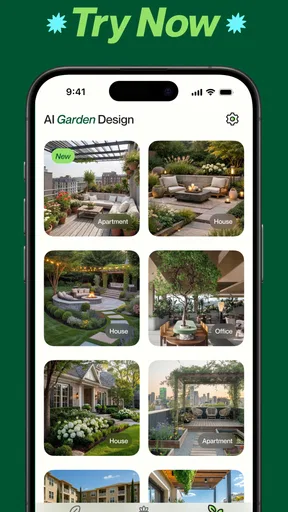
Every week, there’s a featured garden design that showcases creative ideas from users around the world. It’s like a mini Pinterest board right within the app, and it’s fantastic for those days when you’re feeling a bit stuck creatively.
Why This App Stands Out
What really sets Landscape Design - AI Garden apart is its combination of technology and user-centric design. The AI does an impressive job of providing realistic and achievable garden designs, while the app itself remains intuitive and easy to use. Whether you’re a seasoned gardener or a total newbie, the app caters to all skill levels, making garden design accessible and fun.
It’s not just about aesthetics either. The app promotes sustainable gardening practices, encouraging users to choose native plants and eco-friendly materials, which is a big plus in my book.
Making the First Design Useful
The most practical way I’d use an AI-generated garden concept is as a conversation starter with myself, not as a final construction plan. A picture can help me spot the mood I want—a quieter seating corner, a more colorful border, or a clearer route across the yard—but it cannot decide whether that idea fits the ground conditions or how much work I want to take on. I’d keep the image open while making a short list of changes that are genuinely possible in my space.
A useful workflow is to begin with one problem rather than asking for a complete makeover. If the patio feels exposed, focus on privacy and shade; if a corner is neglected, consider how it could become a small planting bed. This keeps the visual suggestions easier to judge. When every part of a garden changes at once, it can be hard to tell which idea actually solves the everyday issue.
From Phone Screen to Weekend Project
Imagine taking a photo on Friday evening because the yard feels awkward but you have no time for detailed planning. You can browse a few directions, save the one that feels closest to your taste, and use the weekend to measure the area and check what is already growing there. That turns the app into a low-pressure first step rather than a promise to buy materials immediately. I’d treat the picture as a guide for discussion with anyone sharing the space, especially before committing to a seating area or a vegetable patch.
Before acting on a visual concept, I’d also compare it with the sun and shade at different times of day, drainage after rain, access to a hose, and the amount of regular care I can manage. These checks are easy to overlook when a design looks polished. A plant combination that appears balanced on screen may still need adjustment to suit the actual conditions, so the plant information is most valuable as a prompt for research and planning, not a substitute for checking local growing needs.
Where AI Design Helps—and Where It Doesn’t
Compared with searching image boards or general garden photos, this app’s photo-based design process has a useful advantage: it gives you a way to imagine changes against your own outdoor space. Inspiration boards are often better for collecting styles and examples, while a landscape professional is the stronger choice when you need a measured plan, technical advice, or a project with complicated levels and drainage. I see this app sitting between those options: more personal than browsing random pictures, but not a replacement for expert planning when the work has real construction risks.
That distinction matters if you are planning a substantial renovation. A generated image may make a layout feel settled before you know the costs, materials, or maintenance involved. I would use it to narrow down preferences and communicate what I like, then verify dimensions and practical details independently. For a small refresh or a first round of ideas, that is a sensible balance; for retaining walls, major paving, or changes that affect water flow, I would seek qualified advice rather than rely on a visual mock-up.
Small Decisions That Improve the Results
Photos are the starting point, so I’d take one in clear daylight and frame the whole area I want to rethink. Including boundaries and existing features makes it easier to compare the suggested arrangement with what is actually there. I’d also take a second photo from another angle when a fence, doorway, or existing tree affects how the space is used. These simple steps help me evaluate a design without assuming that a single attractive view tells the whole story.
Another helpful habit is to change one element at a time after the first suggestion. Try a different planting emphasis or seating idea, then compare the versions before adding more changes. That makes the drag-and-drop experimentation less overwhelming and gives you a clearer sense of what you prefer. If the design starts looking crowded, I’d remove an element rather than keep adding features; open space can be just as important as planting and decoration.
The app is free to download, although it includes in-app purchases ranging from $3.99 to $199.99 per item. I’d explore the basic experience first and decide whether any paid option is worth considering only after I understand how I plan to use it. It runs on Android 8.0 or later, and the current version is 1.0.21. The age rating is Everyone, which makes the gardening subject matter broadly suitable, though adults should still make purchase decisions carefully.
Who Will Get the Most Out of It
I think it suits renters and homeowners who want to picture small changes before spending time or money, as well as beginners who need a visual starting point. It can also help someone who knows the yard feels unfinished but cannot explain what is missing. A rough concept gives you something concrete to react to: perhaps you like the color palette but not the layout, or the seating idea but not the planting density. That kind of feedback can make planning less intimidating.
It is less compelling for someone who already has a detailed planting plan, needs accurate construction drawings, or wants a database-driven tool for tracking every plant and task. It may also frustrate people who expect every AI suggestion to be immediately buildable or perfectly suited to local conditions. I would skip it if the goal is a technical landscape specification; I would try it if the goal is to explore possibilities and clarify personal taste.
In the House & Home category, the app has an average rating of 4.4 from around 12,000 ratings, with over 100,000 installs. Its developer is MOBIVERSITE YAZILIM BILISIM REKLAM VE DANISMANLIK. Those figures suggest that many people have tried it, but I’d still judge it by whether its image-led approach fits my own project rather than by popularity alone.
So there you have it, folks. If you’re looking to breathe new life into your outdoor space, give Landscape Design - AI Garden a try. It’s a fun, innovative way to explore your creativity and create the garden of your dreams. Happy gardening!
Verdict
Strengths of Landscape Design - AI Garden
- User-friendly interface for quick design.
- AI suggestions improve creativity.
- Extensive plant database included.
- Features 3D visualization tools.
- Regular updates with new features.
Limitations of Landscape Design - AI Garden
- Limited free version functionality.
- Occasional AI misinterpretations.
- Requires stable internet connection.
- Subscription model may be pricey.
- Some tools need a learning curve.
Other Releases by MOBIVERSITE YAZILIM BILISIM REKLAM VE DANISMANLIK
View All
Donna AI Song & Music Maker
Music & Audio4.7

AI Photo Video Generator: IRMO
Art & Design4.5

KAI: Comic Maker Manga, Manhwa
Comics3.8
Similar Picks in This Category
View All
Universal TV Remote Control
CodeMatics Media Solutions3.9

AlfredCamera Home Security app
Alfred Systems Inc.4.7

Planner 5D: AI Home Design
Planner 5D4.5

Universal Tv Remote-Cast to TV
One Music Player4.1

Zillow: Homes for Sale & Rent
Zillow Group4.8

99acres Buy/Rent/Sell Property
infoedge.com4.3
Frequently Asked Questions
What features does Landscape Design - AI Garden offer?
Landscape Design - AI Garden provides a comprehensive suite of tools for designing and visualizing your garden. Key features include AI-powered design suggestions, 3D visualization, plant database, and seasonal planning. The app also allows users to create detailed layouts and experiment with different plant arrangements, helping you plan the perfect garden.
Is Landscape Design - AI Garden suitable for beginners?
Yes, the app is designed to be user-friendly, catering to both beginners and experienced gardeners. It includes intuitive tutorials and a straightforward interface. The AI suggestions guide users through the design process, providing inspiration and practical tips, which makes it perfect for those new to garden design.
Does the app require an internet connection to function?
While some features of Landscape Design - AI Garden require an internet connection, such as accessing the plant database and AI suggestions, many design tools are available offline. This means you can continue designing your garden even in areas without internet access, making it highly versatile.
Can I share my garden designs with others?
Yes, the app includes options to export and share your designs. You can save your garden layouts as images or PDFs and share them via email or social media platforms. This feature is great for collaborating with friends, family, or professional landscapers to get feedback on your ideas.
Is there a cost associated with using Landscape Design - AI Garden?
Landscape Design - AI Garden offers a free version with basic features. However, for full access to advanced tools and the complete plant database, a premium subscription is available. The subscription unlocks additional features such as custom plant suggestions and enhanced 3D visualization tools.
